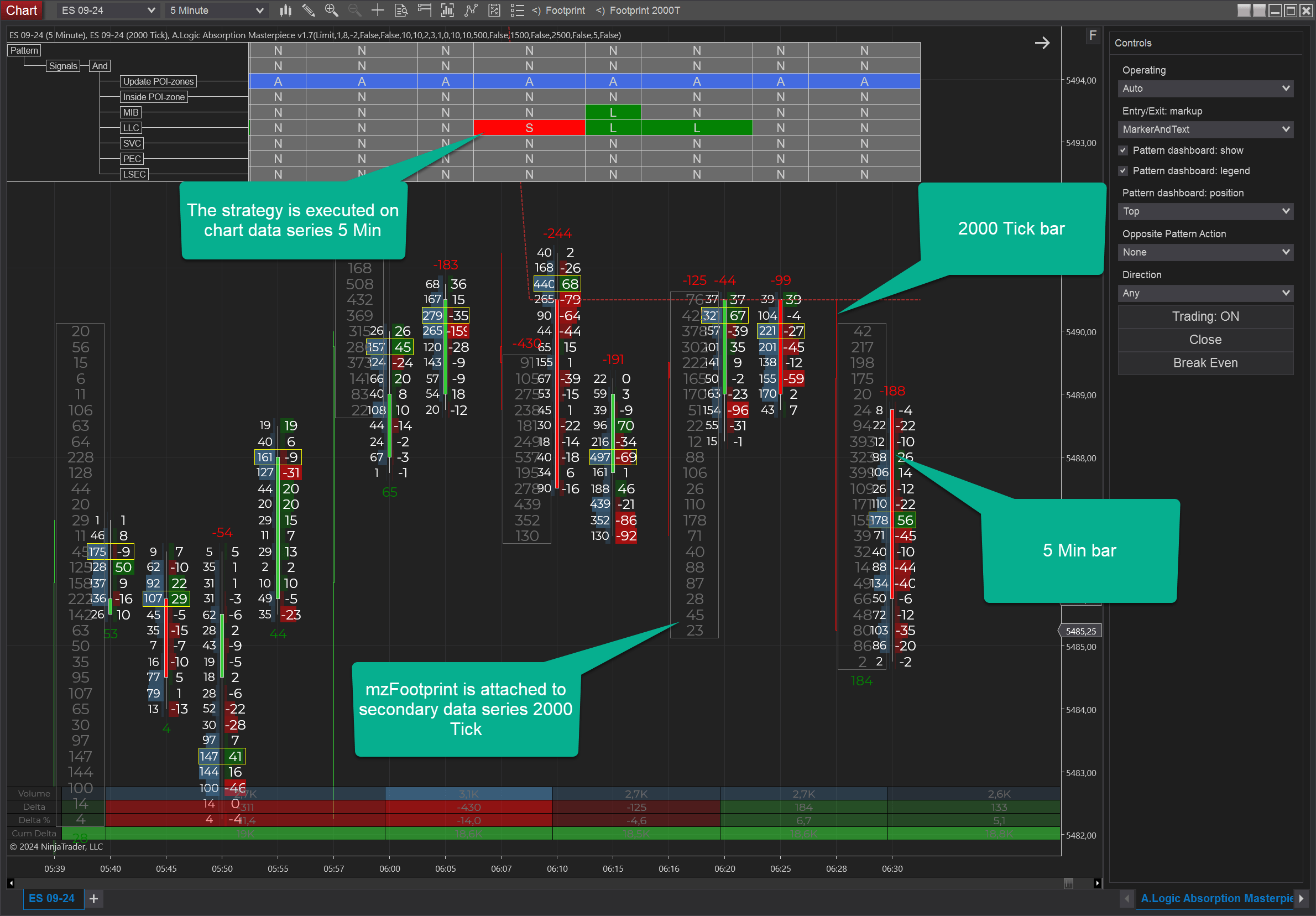
We are working on a custom multi-datasereis strategy under our Coding Service. This example illustrates well the ability to handle multi-dataseries logic of your strategy.
Adding extra dataseries looks like this:
if (State == NinjaTrader.NinjaScript.State.Configure)
{
  AddDataSeries(Instrument.FullName, NinjaTrader.Data.BarsPeriodType.Tick, 2000); // add second dataseries

  WorkingDataSeriesIdx = -1; // pass all dataseries to the core
  PatternValidatingDataSeriesIdx = 0; // validate pattern on main/chart dataseries
  TradingDataSeriesIdx = 0; // set trading dataseries
}
We have two instances of mzFootprint indicator attached to two different datasereis. The second instance is:
FootprintIndicator2000Tick = new StrategyFootprintIndicator(this, @"Footprint 2000T")
{
  DataSeriesIndex = 1,  // attach indicator to 2nd dataseries
  IsBarPositionByOpenTime = true // adjust chart position in case if indicator is visible
}
Also, we have a logical tree with signals driven by two different dataseries.
On the image, you can see how mzFootprint indicatopr is visualized on two different dataseries.